Have you ever found an AI tool that makes your jaw drop, gone straight to the pricing page to sign up… and then just stared at it, confused?
That’s exactly what happens to most people looking into Higgsfield AI pricing for the first time.
The demo videos look like something out of a film set. Then you hit the plans page and instead of a simple price, you’re staring at credits, tiers, annual toggles, and promo banners that seem to change every time you visit.
I’ve been there.
So before you spend a cent, I want to walk you through how Higgsfield actually charges you — in plain language, from a creator’s point of view.
If you’ve been asking things like:
- How much does Higgsfield AI really cost per month?
- What are “credits,” and how many videos do they actually buy me?
- Is there a free version, and is it any good?
- Which plan makes sense for a beginner versus a full-time creator?
- Are there hidden costs I’ll only discover after I pay?
…then you’re in the right place. By the end of this guide you’ll understand every Higgsfield plan, what the credit system really means for your wallet, the fine print worth knowing, and exactly which tier fits your goals.
Let’s get started.
Quick honesty note: Higgsfield changes its pricing and plan names often, and its pricing page loads in a way that’s hard for outside trackers to read reliably.
The numbers below reflect the most consistent figures reported across multiple independent sources in mid-2026.
Treat them as a strong starting map, and confirm the current numbers on the official Higgsfield pricing page before you buy.
What Is Higgsfield AI, Quickly?
If you’re brand new here, a one-paragraph primer will make the pricing make sense.
Higgsfield is an AI video and image generation platform built around one idea its team keeps repeating: cinematic camera control for regular creators. Instead of just typing a prompt and hoping, you get film-style motion presets — dolly shots, orbits, crash zooms — plus access to a large library of image and video models under one roof.
Here’s the part that matters for your budget: Higgsfield doesn’t build just one model and charge you for it.
It bundles dozens of models — its own tools alongside big names in AI video and image generation — into a single subscription. That’s convenient. It’s also the reason the pricing feels complicated, because different models cost you different amounts to run.
Which brings us to the thing you have to understand before you look at a single price.
How Higgsfield AI Pricing Actually Works: The Credit System
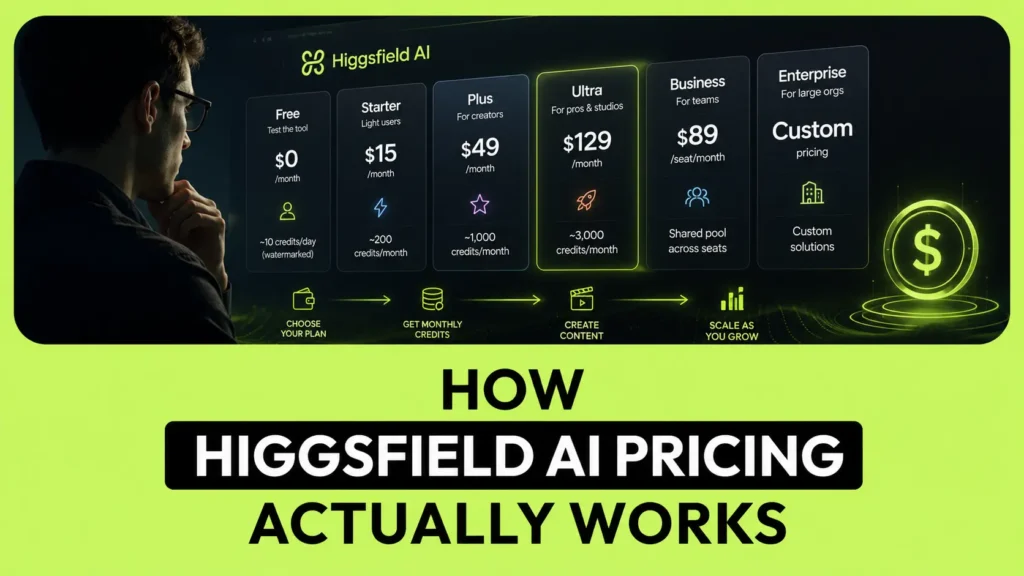
This is the part most articles skip, and it’s the part that decides what you’ll really pay.
Every Higgsfield plan gives you a pool of credits each month, not a set number of videos. When you generate something, Higgsfield subtracts credits from that pool. Simple so far.
The catch is that not every generation costs the same. A quick image on a lightweight model might cost a handful of credits. A short clip on a premium video model at high resolution can burn dozens of credits in one shot. So two people on the identical plan can have completely different experiences — one barely dents their credits all month, the other runs dry in a week.
A few things are worth burning into your memory before you subscribe:
- Premium models eat credits fast. The flagship, film-quality video models cost far more per clip than the budget-friendly ones. If your workflow leans on the most expensive models at high resolution, your credit pool shrinks quickly.
- Cheaper models stretch further. Lighter models can produce many more clips from the same pool, which is great for drafts, tests, and social content where absolute top-tier realism isn’t essential.
- The per-model credit cost isn’t loudly advertised. You’ll see it inside the app when you pick a model and resolution. Check it there for the specific models you plan to use — that single number tells you more about your real cost than the monthly price does.
- Top-up credits exist, but they expire. If you run out, you can buy extra credit packs (reported at roughly $5 per 100 credits). The important fine print: those top-up credits reportedly expire after about 90 days, so don’t stockpile them and expect them to wait for you.
Once this clicks, everything else about Higgsfield AI pricing gets easy. The headline monthly fee is just the door. Credits are the real currency.
Higgsfield AI Pricing Plans in 2026
Here’s the current plan ladder as best I can pin it down from consistent mid-2026 reporting. Higgsfield runs near-constant promotions, so the “sale” price you see on any given day may be lower than the standard rate listed here.
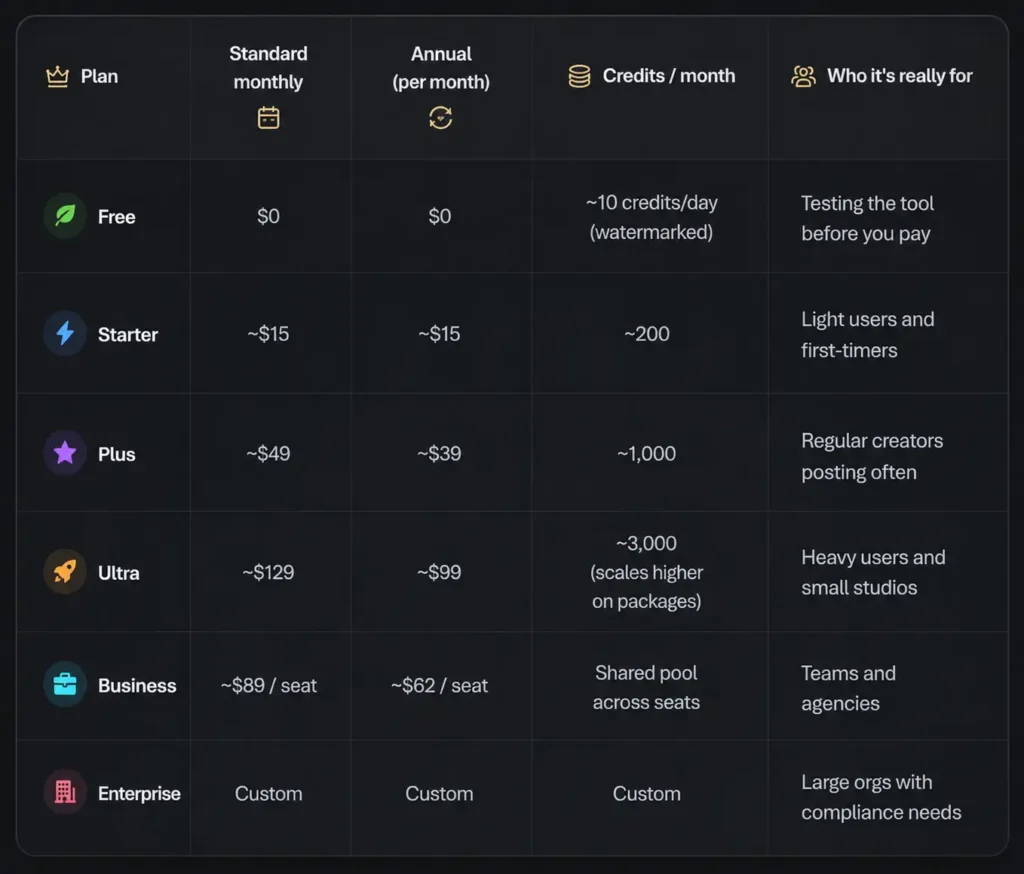
Let me break down what each tier actually gets you.
Free
The free tier is a genuine try-before-you-buy, not a place to run a business. You get a small trickle of credits per day, outputs come watermarked and at limited resolution, and you’re restricted to a selection of models rather than the full library.
Use it for exactly one thing: deciding whether Higgsfield’s motion quality and style fit what you’re trying to make. It’s perfect for that. It is not viable for client work or anything you plan to publish clean.
Starter (~$15/month)
This is the entry paid plan, and it’s aimed at people dipping a toe in. Around 200 credits a month unlocks watermark-free output and more room to experiment.
The honest limitation to know upfront: Starter typically restricts you to a selected set of models — the most expensive premium video models are often walled off at this tier. So if your whole reason for choosing Higgsfield is one specific flagship model, double-check it’s included here before you pay, because it may not be.
Plus (~$49, or ~$39/month billed annually)
For most serious individual creators, Plus is the sweet spot. Around 1,000 credits a month, the full model library unlocked, and more generations running in parallel so you’re not sitting in a queue.
This is the plan I’d point most weekly creators toward first. It’s enough to actually produce and post consistently without constantly watching a near-empty credit meter — and if you find it’s too much or too little after a month, you’ll have real data to move up or down.
Ultra (~$129, or ~$99/month billed annually)
Ultra is built for volume. You’re looking at roughly 3,000 base credits a month, with the ability to scale higher on larger packages, plus the lowest cost-per-credit of any tier and the most parallel generations running at once.
What makes Ultra interesting isn’t just the bigger pool — it’s the value math. Because your credits get cheaper per unit at this tier, heavy producers who’d otherwise buy top-up packs on Plus often come out ahead here. If you’re generating every single day, this is where the numbers start rewarding you instead of punishing you.
Business (~$89/seat, or ~$62/seat billed annually)
The team plan swaps a personal pool for a shared one across multiple seats, and adds the collaboration and usage-visibility features a group actually needs. If several people are pulling from the same credits, per-member analytics stop being a nice-to-have and start being the thing that keeps one teammate from draining the whole pool mid-project.
Enterprise (custom)
Sales-led, custom-quoted, and aimed at larger organizations with specific volume, security, or compliance requirements. If you have to ask about SSO and procurement, this is your lane.
What Can You Actually Make With the Credits?
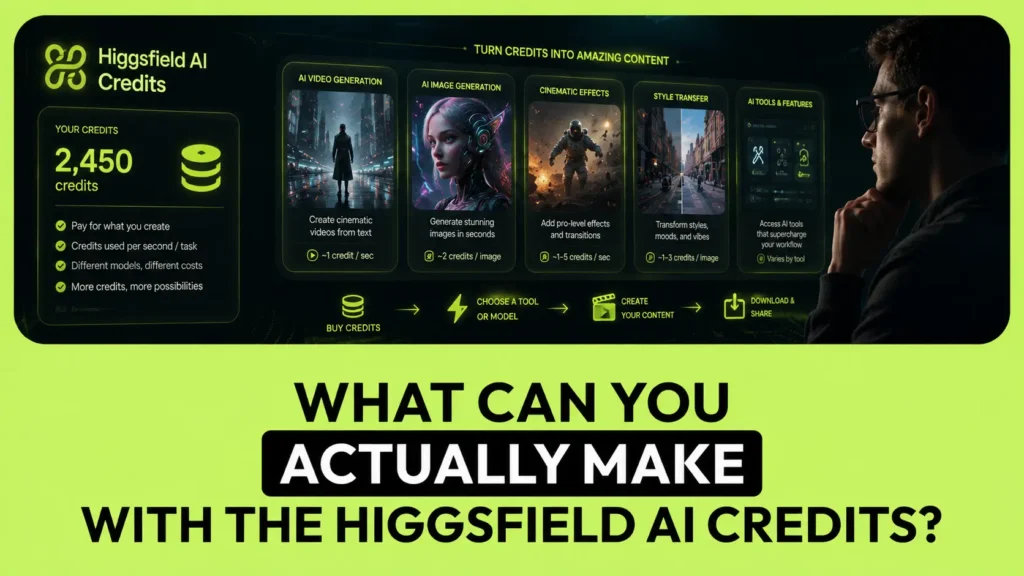
This is where I can save you from a nasty surprise.
Because premium video models are so credit-hungry, a plan’s credit number can be misleading if you only run the expensive stuff. Reported examples from mid-2026 give a rough feel:
- A short clip on a budget-friendly video model costs a small slice of credits, so a mid-tier plan can produce a healthy stack of them.
- A short clip on a flagship, film-quality video model at higher resolution can cost dozens of credits each — which means even a 3,000-credit Ultra plan might only yield somewhere around fifty of those premium clips in a month.
In other words: the same Ultra plan could give you hundreds of lightweight clips or only a few dozen top-tier ones. Your model choice, not your plan, is the biggest lever on your real output.
My advice: in your first week on any plan, generate a few clips using the exact models and resolution you actually plan to use, then check how many credits each one cost. That single test tells you whether to stay put, drop a tier, or move up — far more reliably than any pricing table, including this one.
Is Higgsfield AI Free? The Free Tier and Trial Windows
Short version: yes, there’s a free tier, but it’s deliberately thin.
You get a small daily allotment of credits — enough for a couple of short generations a day — with watermarks and limited model access. It’s a demo, not a free workhorse. If you only make a video or two a month, you might scrape by on it, but you won’t be publishing clean, unwatermarked work.
What’s more interesting are the promotional free windows Higgsfield layers on top of paid plans. These rotate, but they’ve included things like short-term “unlimited” access to select models and batches of free generations on specific tools. For the right creator, one of those unlimited windows can be worth more than the monthly credit pool itself — so it’s genuinely worth checking what promo is running before you commit to a full year.
Just don’t build your plans around a promo. Promos rotate; the credit system stays.
Hidden Costs and Fine Print Worth Knowing
Honesty is the whole point here, so let me flag the things that trip people up:
- “Unlimited” can slow down. Where a plan advertises unlimited use of certain models, that unlimited access can be throttled during high-traffic periods. It’s still unlimited in quantity — just not always fast when everyone’s generating at once.
- Top-up credits expire. As mentioned, extra credit packs reportedly lapse after around 90 days. Buy them when you need them, not “just in case.”
- The annual discount isn’t a flat number. Annual billing saves you money, but the savings vary by plan rather than being one consistent percentage. Do the per-plan math rather than trusting a single “save X%” badge.
- Annual means commitment. The cheapest monthly rates usually require paying for a full year upfront. That’s fine if you’re sure — expensive if you’re not. When in doubt, start monthly, confirm the tool fits, then switch to annual.
- The most expensive models may be locked on Starter. If a specific flagship model is your reason for choosing Higgsfield, confirm it’s available on the tier you’re buying.
- Prices and names change. Higgsfield has restructured and renamed its plans more than once in 2026. Whatever you read anywhere — including this article — verify the live numbers before you pay.
Which Higgsfield Plan Should You Choose?
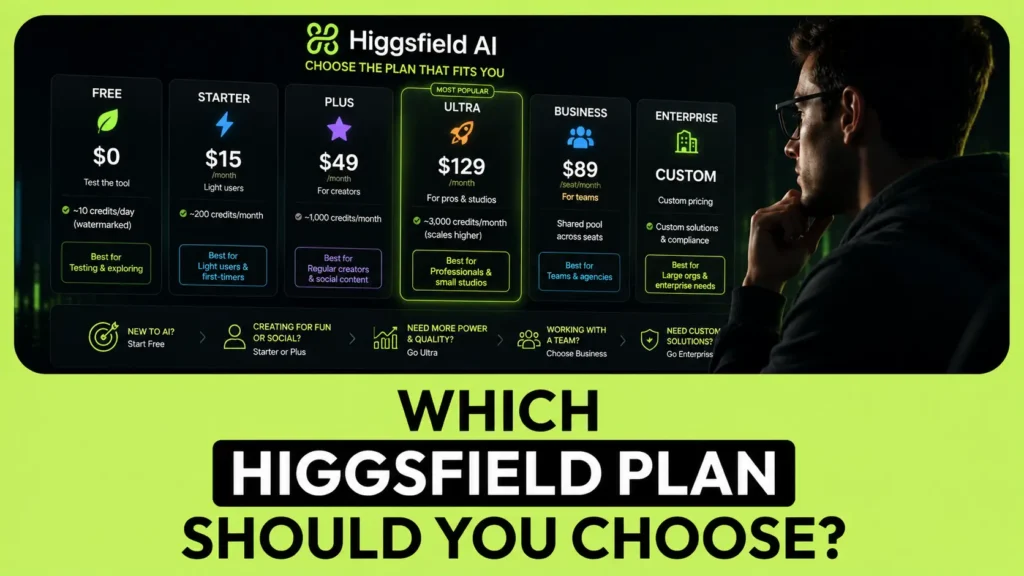
Don’t pick a tier because it looks like the “normal” one. Pick the one that matches how much you’ll actually generate. Here’s how I’d guide different creators:
If you’re just testing the waters: Start on the Free tier. Make a few clips, judge the motion and style, and confirm Higgsfield fits your niche before you spend anything.
If you’re a light or occasional creator: Starter (~$15) is your entry point — just make sure the models you care about are included at that tier first.
If you post regularly and want this to be a real part of your workflow: Plus (~$39–$49) is the plan I’d recommend for most people. Full model access, a workable credit pool, and enough parallel power to keep you moving.
If you generate every day or run a small studio: Ultra (~$99–$129) is where the cost-per-credit finally works in your favor. If you’re constantly buying top-ups on Plus, you’ve probably outgrown it — move up.
If you’re a team or agency: The Business plan’s shared pool and analytics are built for you. The per-member visibility alone is worth it once more than two or three people are generating.
And one last honest note: if all you need is plain text-to-video with no cinematic camera work, it’s worth comparing cost-per-clip against dedicated rivals before you commit — you might pay less elsewhere for that specific job. Higgsfield earns its price when you actually use its motion control and model variety. If you want the full landscape, see our complete guide to the best AI video generators to compare your options side by side.
If Higgsfield is the right fit for you, you can try Higgsfield from here and start on the free tier before upgrading.
Higgsfield AI Pricing FAQ
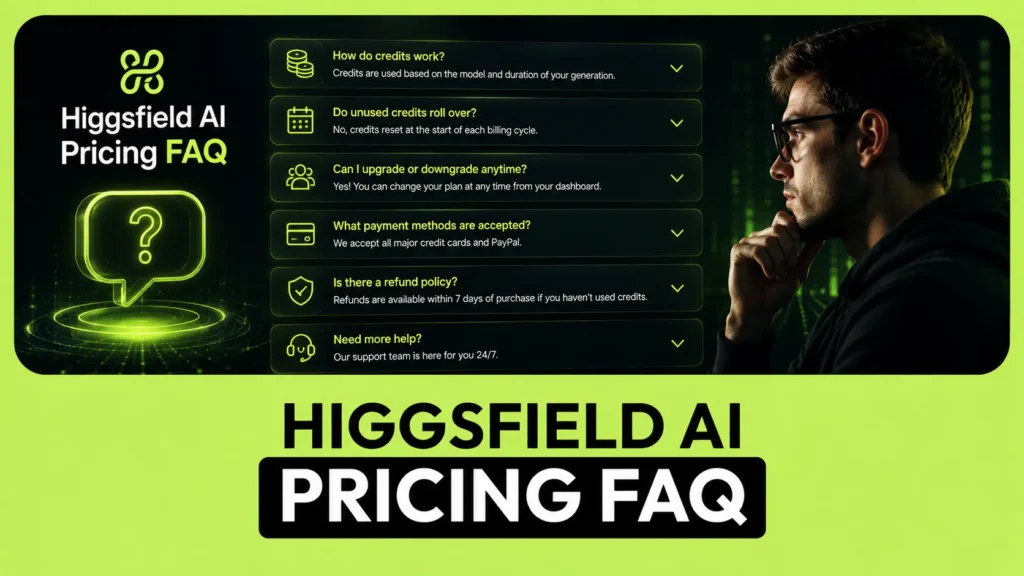
How much does Higgsfield AI cost per month? Paid plans generally start around $15/month for Starter and run up to roughly $129/month for Ultra, with a team-focused Business plan priced per seat. There’s also a free tier and a custom Enterprise option. Because Higgsfield runs frequent promotions, the price you see on the day may be lower.
Does Higgsfield AI have a free plan? Yes, but it’s a light one — a small number of credits per day, watermarked output, and access to only selected models. It’s ideal for testing quality, not for producing publish-ready or commercial work.
What are Higgsfield credits and how do they work? Credits are Higgsfield’s internal currency. Each plan includes a monthly pool, and every generation subtracts credits based on the model and resolution you choose. Premium video models cost far more per clip than lightweight ones, so your real output depends heavily on which models you use.
How many videos can I make with a Higgsfield plan? It varies wildly by model. Lightweight models can produce many clips from a small credit pool, while flagship, film-quality models can cost dozens of credits per clip — meaning even a large plan might only yield a few dozen premium clips a month. Test your specific models in the first week to gauge your real output.
Is annual billing worth it? It lowers your monthly cost, but the exact savings differ by plan rather than being a single flat discount. If you’re confident Higgsfield fits your workflow, annual saves money; if you’re unsure, start monthly and switch once you’re sure.
Do unused or top-up credits roll over? Carryover rules vary by plan, so check your specific tier. Purchased top-up credit packs, in particular, reportedly expire after around 90 days — so buy extra credits only when you’re about to use them.
Can I use Higgsfield for commercial or client work? Paid plans are generally intended for this, while free and entry tiers may carry personal-use limits and watermarks. Always confirm the current commercial-use terms for your specific plan before delivering paid work.
Why do I see different Higgsfield prices on different websites? Because Higgsfield has renamed and restructured its plans more than once in 2026, and its pricing page loads in a way that’s hard for third-party trackers to read consistently. That’s exactly why you should verify the live numbers on the official pricing page before subscribing.
About AIVideo-Expert

I built AIVideo-Expert for one reason: choosing an AI video tool shouldn’t feel like a gamble.
There are dozens of these platforms now, each with confusing credit systems and marketing that oversells.
My job is to cut through it — to test how these tools really feel to use, tell you the honest strengths and weaknesses, and help you spend your money on the tool that fits your goals, not the one with the loudest homepage.
With Higgsfield specifically, the pricing genuinely does change often, so I’ve flagged every number here as something to confirm before you pay.
That’s the whole promise of this site: I’d rather tell you to double-check a figure than pretend I know a price that shifted last week.
If a recommendation here helps you avoid one bad subscription, it’s done its job.
Whenever you’re ready to compare your options, start with the free tier, run the credit test I described above, and let your own workflow — not a pricing table — make the final call.